是什么 Thrift是一个跨语言的RPC框架,它可以通过Thrift的IDL(接口定义语言)来描述接口函数及数据类型,编译后可以自动生成服务端的框架代码。
RPC框架可以分为服务治理和跨语言调用两大类型。前者一般和语言耦合度高,且提供了丰富的功能(负载均衡,服务注册与发现等),比如Java的Dubbo框架。而后者主要解决不同语言的服务间的调用问题,没有太多花哨的功能,比如gRPC,Thrift。
优缺点
优点是可以跨语言使用,性能优秀,自动生成服务端代码,使用起来简单方便。
缺点是没有动态特性。
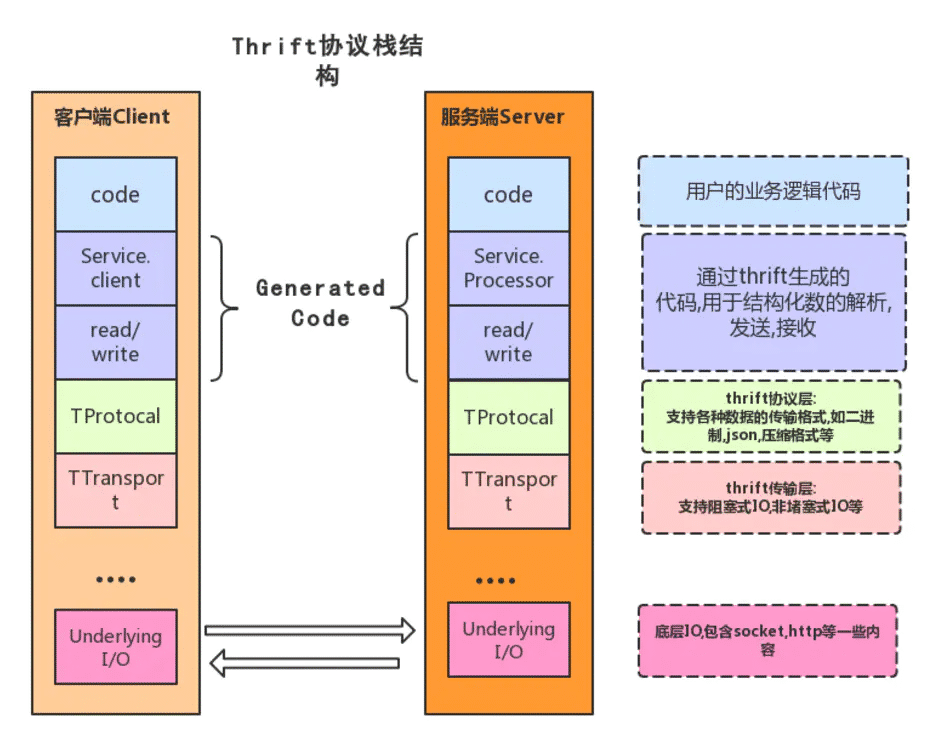
原理 Thrift是一种C/S的架构体系.在最上层是用户自行实现的业务逻辑代码。下层是由Thrift编译器自动生成的代码,主要用于结构化数据的解析,发送和接收。
Transport:
为从网络进行读写提供了简单的抽象。负责以字节流方式接收和发送消息体,不关注是什么数据类型。底层IO负责实际的数据传输,包括socket、文件和压缩数据流等。它解耦了上层部分(如序列化)与数据的传输。
Protocol:
TProtocol是用于数据类型解析的,即序列化和反序列化,将结构化数据转化为字节流给TTransport进行传输。
Processor:
从输入流中读入数据,然后委托给处理代码进行处理(自己编写),最后写到输出流中。输入、输出流由下层的Protocal对象提供,接口非常简单:
1
2
3
interface TProcessor bool process (TProtocol in, TProtocol out) throws TException }
Server:
整合了上面所有的功能:
Create a transport
Create input/output protocols for the transport
Create a processor based on the input/output protocols
Wait for incoming connections and hand them off to the processor
实例 我们使用Thrift实现一个匹配系统,客户端调用远程服务器将用户两两间进行匹配,比如玩各种1V1游戏时,将段位相似的玩家匹配到一起。客户端使用Python,服务端使用Java。
源码在 https://github.com/xiaoxiaokun/ThriftDemo。
定义服务器接口 使用thrift定义的类型写一个thrift文件,再使用 thrift -r --gen <language> <thrift file> 自动生成客户端和服务端代码
1
2
3
4
5
6
7
8
9
10
11
12
13
14
15
16
17
18
19
20
21
22
23
namespace java match struct Player { 1 : i32 id, 2 : string name, 3 : i32 score } service Match { i32 add (1 :i32 id, 2 :string name, 3 :i32 score) , i32 remove (1 :i32 id, 2 :string name) }
使用命令生成的源码主要有两个文件,一个文件封装thrift中定义的接口方法,一个文件封装定义的类型。我们只需要在服务端实现该接口,在客户端调用该接口即可。
客户端 使用Python编写,用上述命令生成Python源码,主要得到
1
2
3
4
5
6
7
8
9
10
11
12
13
14
15
16
17
18
19
20
21
22
23
24
25
26
27
28
29
30
31
32
33
34
35
36
37
38
39
40
41
42
43
44
45
46
47
48
49
from pydoc import clifrom sys import stdinfrom match import Matchfrom match.ttypes import *from thrift import Thriftfrom thrift.transport import TSocketfrom thrift.transport import TTransportfrom thrift.protocol import TBinaryProtocoldef operate (op, id , username, score ): transport = TSocket.TSocket('localhost' , 9090 ) transport = TTransport.TBufferedTransport(transport) protocol = TBinaryProtocol.TBinaryProtocol(transport) client = Match.Client(protocol) transport.open () print(op) if op == 'add' : client.add(id , username, score) elif op == 'remove' : client.remove(id , username) transport.close() def main (): while True : line = stdin.readline() if not line: break line = line.strip() if not line: continue op, id , username, score = line.split() operate(op, int (id ), username, int (score)) if __name__ == '__main__' : main()
服务端 用Java编写,生成源码后得到 Match.java 和 Player.java 文件,和生成的Python源码类似。
Match主要提供了Iface的接口,我们只要实现其中的add和remove方法即可,其余的创建Transport、创建Protocol、创建Server只需要调用Thrift提供的现成的实现类就好,而且Thrift对每一层的接口都提供了多种实现,用户可以根据需要选择合适的实现类,比如Server层提供了单线程和多线程实现,处理器也提供了同步和异步的实现。
创建一个 MatchServerHandle 类来实现接口中的方法:
1
2
3
4
5
6
7
8
9
10
11
12
13
14
15
16
17
18
19
20
21
22
23
24
25
26
27
public class MatchServerHandle implements Match .Iface @Override public int add (int id, String name, int score) log.info("add..." ); MatchServer.Task task = new MatchServer.Task(); task.player = new Player(id, name, score); task.opType = "add" ; synchronized (MatchServer.taskQueue) { MatchServer.taskQueue.add(task); MatchServer.taskQueue.notify(); } return 0 ; } @Override public int remove (int id, String name) log.info("remove..." ); MatchServer.Task task = new MatchServer.Task(); task.player = new Player(id, name); task.opType = "remove" ; synchronized (MatchServer.taskQueue) { MatchServer.taskQueue.add(task); MatchServer.taskQueue.notify(); } return 0 ; } }
创建一个服务端的启动类,负责监听客户端请求,并创建添加、移除玩家的任务:
1
2
3
4
5
6
7
8
9
10
11
12
13
14
15
16
17
18
19
20
21
22
23
24
25
26
27
28
29
30
31
32
33
34
35
36
37
38
39
40
41
42
43
44
45
46
47
48
49
50
51
52
53
54
55
56
57
58
59
60
public class MatchServer private static MatchServerHandle handler; private static Match.Processor<MatchServerHandle> processor; private static MatchPool pool; static class Task Player player; String opType; } static final Queue<Task> taskQueue = new ConcurrentLinkedQueue<>(); public static void main (String[] args) throws TException try { handler = new MatchServerHandle(); processor = new Match.Processor<>(handler); pool = new MatchPool(); TServerTransport serverTransport = new TServerSocket(9090 ); TServer server = new TSimpleServer(new TThreadPoolServer.Args(serverTransport).processor(processor)); log.info("Match Server Starting..." ); Runnable createTask = MatchServer::createTask; new Thread(createTask, "crtTaskTread" ).start(); server.serve(); } catch (Exception x) { x.printStackTrace(); } } private static void createTask () while (true ) { synchronized (taskQueue) { if (taskQueue.isEmpty()) { try { taskQueue.wait(); } catch (InterruptedException e) { e.printStackTrace(); return ; } } else { Task t = taskQueue.poll(); if ("add" .equals(t.opType)) { pool.add(t.player); } else if ("remove" .equals(t.opType)) { pool.remove(t.player); } } pool.match(); } } } }
还需要一个类负责处理任务,进行玩家间的匹配:
1
2
3
4
5
6
7
8
9
10
11
12
13
14
15
16
17
18
19
20
21
22
23
public class MatchPool TreeSet<Player> players = new TreeSet<>(Comparator.comparingInt(Player::getScore)); public void add (Player player) log.info("pool add player..." ); players.add(player); } public void remove (Player player) log.info("pool remove player..." ); players.removeIf(p -> p.id == player.id); } public void match () if (players.size() < 2 ) return ; Player player1 = players.pollFirst(); Player player2 = players.pollFirst(); assert player1 != null ; assert player2 != null ; System.out.println("match " + player1.name + " and " + player2.name); } }
这样就基本完成了,同时启动客户端和远处的服务端,在Python客户端中输入,远程的Java服务进行处理后返回响应。